


Sending Valentine's Gifts Through Safeway Delivery
Safeway's gifting feature lets you send flowers, chocolate-covered strawberries, wine, candy, and other Valentine's items directly to someone else's address. You shop online, enter their delivery information at checkout, and Safeway handles the rest.
The catch: delivery slots fill up around Valentine's Day. If you're planning to send a gift for February 14th delivery, don't wait until the last minute to order. Check slot availability early and book as soon as you know what you want to send.
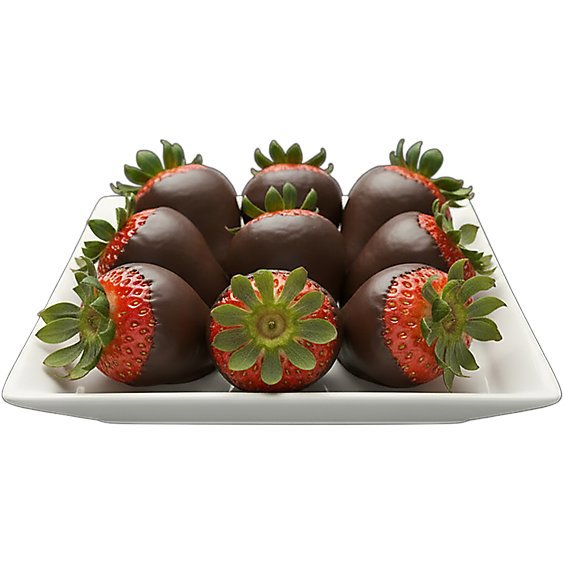
Check Out Valentine’s Day 🌹 Gifts
How the Gifting Feature Works
The gifting function works like regular online shopping, except the order goes to the recipient's address instead of yours. You browse safeway.com or the Safeway app, add items to your cart, and select the gifting option at checkout. Enter the recipient's name and address, write a message, and pick a delivery time from available slots.
Your payment information stays with you. The recipient receives the gift with a card showing your name and whatever message you wrote.
This differs from a gift card in a practical way: gift cards require the recipient to shop and make decisions. A gift order arrives ready to enjoy. Flowers show up arranged. Chocolates arrive boxed. The recipient doesn't have to do anything except answer the door.
When Sending Gifts This Way Makes Sense
Long-distance relationships. You can send flowers to someone in another state as easily as across town. No need to research local florists or coordinate shipping from specialty retailers. If Safeway delivers to their address, you can send them a gift.
Surprise deliveries. The recipient doesn't need to know a gift is coming. Schedule delivery for Valentine's Day morning and it arrives while you're at work. They get a surprise; you don't have to be there.
Busy schedules. Order from your phone during lunch. No trip to the store required. Useful when your schedule doesn't allow time to shop in person.
Different cities, same account. If you're traveling or live in a different city than the recipient, you can still send something. Your Safeway account works regardless of where you are.
Multiple recipients. Send gifts to your partner, your mom, and your friend without visiting three stores. Each order goes to a different address. You place separate orders for each person.
What to Send

Flowers
Red roses are the traditional choice, but Safeway carries mixed bouquets, tulips, lilies, carnations, and potted plants like orchids. Pre-made arrangements arrive ready for display.
One thing to consider: flowers are perishable. They'll be fine for same-day or next-day delivery, but don't schedule flower delivery days in advance if you can avoid it.
For more detail on flower types and what's typically available, see our Valentine's Day flowers guide.
Chocolate-Covered Strawberries
Fresh strawberries dipped in chocolate. These are a Valentine's signature item and tend to sell out. Order online to guarantee availability rather than hoping your local store has them.
Chocolate-covered strawberries are highly perishable. Send them for same-day or next-day delivery only. They need refrigeration and taste best within a day or two of delivery.

Wine and Champagne
Sparkling wine signals celebration. Red wine pairs with chocolate desserts or a steak dinner. Rosé works for lighter preferences.
Important: the recipient must show valid government-issued ID proving they're of legal drinking age when accepting delivery. If they can't show ID, the driver can't hand over the alcohol. The rest of the order will still be delivered, but the alcohol portion won't be.
Plan accordingly if you're sending to a workplace or somewhere the recipient might not have ID handy.

Chocolate and Candy
Heart-shaped boxes of assorted chocolates are the classic Valentine's gift. Name brands like Ghirardelli and Godiva are available alongside more affordable options. Individual chocolate bars work for people with specific tastes (dark chocolate only, no nuts, etc.).
Conversation hearts, foil-wrapped chocolate hearts, and Valentine's candy bags can round out an order or work as standalone gifts for kids.
Greeting Cards
Add a card to your order and include a personal message. Safeway prints your message on a card that arrives with the delivery.
Write something specific. "Happy Valentine's Day" is fine, but "Thank you for making this year easier than last year" or "I'm glad we found each other" means more. The card is the part that makes it feel like a gift rather than a delivery.
Bakery Items
Heart-shaped cookies, cupcakes, and cakes from the bakery section. These work especially well for kids or family gifts. Check what's available online since selection varies.
Gift Bundles
Safeway sometimes offers pre-assembled Valentine's bundles combining flowers, chocolates, and cards. These take the guesswork out of putting together a gift and may cost less than buying items separately. Look for them on the Valentine's Day section of the website.
Gift Ideas by Recipient
Romantic Partner
Flowers plus chocolate-covered strawberries is the classic combination. Add a bottle of wine or champagne if they drink. Include a card with an actual message, not just your signature.
If you know they don't care about flowers, consider sending ingredients for a nice dinner instead. Steaks, wine, and dessert. Or their favorite snacks and a movie rental suggestion.
Parents or Grandparents
Flowers or a potted plant. Orchids last for weeks and feel thoughtful. Include a card that says something specific about why you appreciate them.
Skip the chocolate-covered strawberries unless you know they'll eat them quickly. Older recipients may not get through perishable items before they go bad.
Friends (Galentine's)
Wine and cheese. Or wine and chocolate. Or just wine. Add crackers and fancy snacks if you want to send more.
For non-drinking friends, a nice tea selection, fancy cookies, or a fruit and cheese spread.
Kids
Valentine's candy assortment, heart-shaped cookies or cupcakes, and maybe a small stuffed animal if the store has them. Skip the wine.
Coworkers
Keep it simple and appropriate. A small box of chocolates or a modest flower arrangement. Nothing too personal or expensive.
How to Place a Gift Order
Go to safeway.com or open the Safeway app
Browse and add items to your cart
At checkout, select the gifting option
Enter the recipient's name and delivery address
Write your message (this prints on a card included with delivery)
Select from available delivery time slots
Complete payment
Your name appears on the gift notification whether you write a custom message or not. The recipient will know who sent it.
Delivery Options and Limitations
Standard Delivery
Available in various time windows throughout the day. You pick a slot at checkout, like "2pm-4pm" or "5pm-7pm."
Delivery fees vary by time slot and order size. There's a minimum order amount for delivery (check the website for current minimums, as these can change).
Same-Day Delivery
Order in the morning or early afternoon for evening delivery. This works for last-minute gifts, but only if slots are available.
Here's the reality: on Valentine's Day, same-day delivery slots fill up fast. If you're ordering on February 14th and hoping for same-day delivery, check availability first. The slots may already be taken, especially for popular evening windows.
Flash Delivery
In participating areas, Flash delivers in as fast as 30 minutes. This is your best option for true last-minute orders.
Limitations: Flash is only available 8am-5pm. Maximum 35 items per order. Not available everywhere. Check if your recipient's address is in a Flash delivery zone before counting on this.
What All Delivery Options Have in Common
Delivery slots are not unlimited. They fill up. Valentine's Day is one of the busiest delivery days of the year. The closer you get to February 14th, the fewer slots remain.
If you want a specific delivery window on Valentine's Day, order several days in advance. If you wait until February 14th to order, you may not get the time slot you want, or any slot at all.
Timing Your Delivery
February 13th: Gets the gift there the day before. Good for building anticipation or avoiding the Valentine's Day delivery crunch. Also useful if you're worried about slots filling up.
Valentine's Day morning: Arrives before they leave for work. Nice surprise to start the day. Book this slot early since morning windows are popular.
Valentine's Day midday: Good for workplace deliveries. Make sure you have the correct work address and that the building accepts deliveries.
Valentine's Day evening: Arrives when they get home. Romantic timing, but evening slots fill up fastest. Book well in advance.
What Happens During Delivery
The driver brings the order to the address you specified. If items need to stay cold, they're packed appropriately for the delivery window.
For alcohol deliveries, the driver checks ID. No valid ID, no alcohol. This isn't negotiable.
If no one is home, what happens depends on the items. Non-perishable items might be left at the door (depending on your delivery instructions). Perishable items or alcohol typically require someone to be present.
You can track the order in your Safeway account. You'll see when it's being prepared, when it's out for delivery, and when it's been delivered.
If Something Goes Wrong
Delivery fails: If the driver can't complete delivery (wrong address, no one home for items requiring signature, etc.), the order returns to the store. You'll get notification and can request a refund or provide new delivery instructions.
Items out of stock: You set substitution preferences when ordering. If you allow substitutions, the shopper may swap similar items (pink roses if red are out, for example). If you don't allow substitutions, out-of-stock items are simply removed and you're charged less.
Items arrive damaged: Contact Safeway customer service. Keep photos if possible. They'll typically issue a refund or credit.
Wrong items delivered: Same process. Contact customer service with details.
Common Questions
Can I send to another city or state?
Yes, anywhere within Safeway delivery areas. This includes other cities and states. Enter the recipient's address at checkout to confirm delivery is available there.
Will they know who sent it?
Yes. Your name appears on the delivery notification and the included card. There's no way to send anonymously through this feature.
Can I write a message?
Yes. During checkout, you write a message that Safeway prints on a card included with delivery. Take time to write something personal.
What if I need to cancel?
Cancel before the order is picked and prepared to receive a full refund. The sooner you cancel, the better. Once the order is in progress, cancellation may not be possible.
Does the recipient need a Safeway account?
No. You use your own account to order and pay. You only need their delivery address.
Can I send alcohol?
Yes, but the recipient must show valid ID proving legal drinking age at delivery. Without ID, the alcohol can't be handed over. The rest of the order still delivers.
What about apartments or dorms?
Include the apartment or room number in the address. For dorms, confirm where the student actually receives packages. Some schools have central mail rooms; others deliver to rooms. Use whichever address works.
Can I send to a workplace?
Yes, but confirm the address accepts deliveries and that someone will be there to receive it. Include any suite numbers or building instructions. Some offices have specific delivery procedures.
How do I know when it's delivered?
Track the order in your Safeway account. You'll see delivery confirmation when it arrives. Some orders also trigger email or app notifications.
Can I schedule delivery for a specific date in the future?
You can select from available delivery slots at checkout. How far in advance you can schedule depends on when slots open up. For Valentine's Day specifically, slots become available and then fill up. Check early and book as soon as you see your preferred window.
What's the delivery area?
Safeway delivers where Safeway operates. If there's a Safeway store that delivers to the recipient's address, you can send a gift there. Enter their address during checkout to confirm availability.